Quickimport/-export für Kontakte und Kalender:
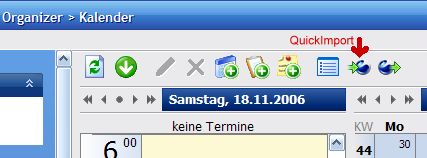
Praktisch wenn man immer die selbe Datei importiert oder exportiert. Es werden dann bei den Kontakten bzw. im Kalender in der Toolbar zwei zusätzliche Buttons angezeigt.
Code:
[Main]
Organizer_Standardfile=<Pfad zur Datei> *.vcs, *.ics
Phonebook_Standardfile=<Pfad zur Datei> *.vcf, *.csv, *.ldif, *.ldi
but unfortunately, this path is not defaulted when I rightclick on the calendar to do an import. Is this where and how it should work? Or do I overlook something?
same problem here... although I use a proper online calendar system.
I have found a workaround which includes a bit more work. I am currently downloading the ics file via wget in a batch file, before doing the quickimport (from the then local file).
I was using Sunbird for that (as intermediate step), but I wanted to skip that step. And while playing around I discovered that it was possible to import with the google link directly....!!
FJ earlier said that Google calendar import was not an easy thing to do, but it now seems very very close to me.....
I only have to paste everytime the *.ics link in the "path". I hoped this could be defaulted (automated) there (as described in the tweaks by adding this path to the general.ini), but for some reason it did not work. Perhaps I am overlooking something?
I personally only import from google calendar to the phone, I do not bother synchronizing, so if the above would works, it's perfect for me!
Well, that is exactly my problem. I have added the path to the general.ini, but without succes.
Every time when I go to the calendar, right click, navigate to import calendar: a window pops up where I can select my *.ics path.
I would expect my "http://www.google.com/calendar/ical/<loginname>@gmail.com/private-b1234567890qwertyu45678f/basic.ics " here to show up, but it is always empty. I have tried both with quotes (") around it and without:
[Main]
Organizer_Standardfile=http://www.google.com/calendar/ical/<loginname>@gmail.com/private-b1234567890qwertyu45678f/basic.ics
or
[Main]
Organizer_Standardfile="http://www.google.com/calendar/ical/<loginname>@gmail.com/private-b1234567890qwertyu45678f/basic.ics"
But both do not work.
Am I doing something wrong? Do I overlook something?
When I paste the "http///etc." in the path (calendar import in MPE), the data is retrieved correctly and can be imported into the telephone.
When I paste the link in a browser, it's asksing me if I want to open it with outlook or save it somewhere. But I don't see the point why I should check this.
I just hoped that the "http://etc" would already be there in the path (calendar import in MPE). Should I send you some screenshots?
We are talking about the Quick-Import not import throught any other possibilities.
If you add the entry to your general.ini you'll find two new Buttons in the Toolbar - these are for the Quickimport
FJ hat geschrieben:If you add the entry to your general.ini you'll find two new Buttons in the Toolbar - these are for the Quickimport
Ok, so it works different than what I expected. It looks even better.
But whatever I try in the general.ini, I don't get any extra buttons in any toolbar, wherever I look in the application. I switched back to english, but also no buttons there.... Where exactly should these buttons appear?
It should look like this:
Are you sure you are editing the right general.ini-File ? Not the one in the programdirectory, you have to edit the one in the database-folder.
PS.: Please update to 1.5.4, there was a bad bug in 1.5.3 with the communication.
Ok, I now have the buttons! I indeed was editing the wrong general.ini file. Thanks for showing me.
Unfortunately, importing the .ics file does not seem to work.
- When I press the "import button", nothing happens. When I use the same 'http://......ics" link in the calendar itself, it does import correctly into MPE.
- When I press the "export button", i get an error messag that it can't create the file: this is as expected and 'correct' as it not a synchronization.
 Thanks for showing me.