Since I downloaded the latest software update for my phone (Android version 4.0.4) I haven't been able to connect my phone to my computer. Then to make things a little bit more interesting my laptop OS was changed from Windows XP to Windows 7 (64 bit). I have tried everything I can but my car computer has no bluetooth and the Wifi is limited to network connections not to devices by company policy so I cannot use it to sync.
Anything that I can do? Your program worked beautifully before!
Anyone out there with the same issue that found a solution?
Jim
Motorola Atrix 2 not connecting after software update
So you did use the USB-Connection before ?
Many models will need a adb driver update after Android 4 was installed, also check if "USB Debugging" is still enabled in the phone.
Many models will need a adb driver update after Android 4 was installed, also check if "USB Debugging" is still enabled in the phone.
Ich bitte um Verständnis daß ich aufgrund des hohen Aufkommens im Forum und meines zeitlichen Rahmens nichtmehr jeden Thread im Forum persönlich lesen bzw. beantworten kann.
Bitte benutzt auch die Forum-Suche bzw. die FAQ
Bitte benutzt auch die Forum-Suche bzw. die FAQ
Yes I used the USB connection before without issues and I have USB debugging enabled. I haven't actually found a specific Adb driver. All I get are links to Motorola device manager or Moto Cast. After installing any of these I (and connecting my phoneto the pc) I don't see any Motorola devices on my USB devices list just a generic USB mass storage device.
By the way, here is my connect log:
Logdatei MyPhoneExplorer
************************
Programmversion: 1.8.4
Datum: 10/24/2012
11:28:27.61 Setting Port: 999
11:28:27.62 Setting Baud: 115200
11:28:27.62 Avaiable Ports: COM3=Winachsf0; COM4=\Device\Serial0;
11:28:28.16 Main Load frmSplash
11:28:28.49 Load frmSplash...
11:28:35.87 Hauptfenster wird geladen
11:28:43.86 Sidebar fertig geladen
11:28:45.23 UC SMS wird geladen
11:28:45.27 UC Phonebook wird geladen
11:28:45.33 UC Phonebook fertig geladen
11:28:45.33 UC Calls wird geladen
11:28:45.36 UC Organizer wird geladen
11:28:45.68 Organizer initiated
11:28:45.72 Startpage=1
11:28:45.73 UC Filebrowser wird geladen
11:28:46.09 UC Filebrowser fertig geladen
11:28:46.09 UC AppBrowser wird geladen
11:28:46.10 UC Notes wird geladen
11:28:46.12 UC Calls wird geladen
11:28:46.87 Setting Lastuser:
11:28:46.98 Lade Userdatenbank:
11:28:48.59 Kontakte geladen
11:28:48.62 Anrufe geladen
11:28:48.62 Organizer LoadUser DefaultTimeColWidth=119
11:28:48.62 Organizer geladen
11:28:48.63 Notizen geladen
11:28:48.63 SMS geladen
11:28:54.21 Hauptfenster fertig geladen
11:28:55.79 Downloader: RC=6 BytesMax=5 URL=http://www.fjsoft.at/myphoneexplorer/version.txt
11:28:56.45 Refresh ComDescriptions...
11:28:56.49 PORT: COM4 Enumerator=PCI Displayed=Intel(R) Active Management Technology - SOL InstanceID=PCI\VEN_8086&DEV_3B67&SUBSYS_216217AA&REV_06\3&E89B380&0&B3
11:28:56.51 MODEM: COM3 Enumerator=HDAUDIO Displayed=ThinkPad Modem Adapter FriendlyName=ThinkPad Modem Adapter InstanceID=HDAUDIO\FUNC_02&VEN_14F1&DEV_5069&SUBSYS_17AA214D&REV_1003\4&3AD39C8&0&0002
11:28:57.10 StickyNotesPath=C:\Windows\Sysnative\StikyNot.exe FileExists=True
11:28:57.16 StickyNotesTitle=Sticky Notes
11:29:02.63 OK pressed in settingswindow
11:29:02.67 Set first swap of settings
11:29:02.67 Apply new holidays
11:29:02.68 Holidays applied
11:29:02.68 Second swap of settings set
11:29:02.68 Everything is done
11:29:05.25 RunADBCommand: start-server
11:29:11.71 ADB CommandResponse: adb server is out of date. killing...
* daemon started successfully *
11:29:11.71 RunADBCommand: devices
11:29:12.04 ADB CommandResponse: List of devices attached
11:29:12.04 Run DeviceTracker
11:29:12.08 Init Tracker
11:29:12.08 Device Tracker Message: OKAY0000
11:29:12.08 Connect to Android failed!
11:29:12.08 bOpened=False
11:29:12.08 No device attached to USB
11:29:12.08 Refresh ComDescriptions...
11:29:12.09 PORT: COM4 Enumerator=PCI Displayed=Intel(R) Active Management Technology - SOL InstanceID=PCI\VEN_8086&DEV_3B67&SUBSYS_216217AA&REV_06\3&E89B380&0&B3
11:29:12.09 MODEM: COM3 Enumerator=HDAUDIO Displayed=ThinkPad Modem Adapter FriendlyName=ThinkPad Modem Adapter InstanceID=HDAUDIO\FUNC_02&VEN_14F1&DEV_5069&SUBSYS_17AA214D&REV_1003\4&3AD39C8&0&0002
11:29:12.10 ErrMsg: Connection to phone could not be established:
No device attached to USB
11:29:24.63 Refresh ComDescriptions...
11:29:24.63 PORT: COM4 Enumerator=PCI Displayed=Intel(R) Active Management Technology - SOL InstanceID=PCI\VEN_8086&DEV_3B67&SUBSYS_216217AA&REV_06\3&E89B380&0&B3
11:29:24.63 MODEM: COM3 Enumerator=HDAUDIO Displayed=ThinkPad Modem Adapter FriendlyName=ThinkPad Modem Adapter InstanceID=HDAUDIO\FUNC_02&VEN_14F1&DEV_5069&SUBSYS_17AA214D&REV_1003\4&3AD39C8&0&0002
11:29:57.96 OK pressed in settingswindow
11:29:58.00 Set first swap of settings
11:29:58.01 Apply new holidays
11:29:58.01 Holidays applied
11:29:58.01 Second swap of settings set
11:29:58.02 Everything is done
11:31:11.76 Refresh ComDescriptions...
11:31:11.76 PORT: COM4 Enumerator=PCI Displayed=Intel(R) Active Management Technology - SOL InstanceID=PCI\VEN_8086&DEV_3B67&SUBSYS_216217AA&REV_06\3&E89B380&0&B3
11:31:11.76 MODEM: COM3 Enumerator=HDAUDIO Displayed=ThinkPad Modem Adapter FriendlyName=ThinkPad Modem Adapter InstanceID=HDAUDIO\FUNC_02&VEN_14F1&DEV_5069&SUBSYS_17AA214D&REV_1003\4&3AD39C8&0&0002
By the way, here is my connect log:
Logdatei MyPhoneExplorer
************************
Programmversion: 1.8.4
Datum: 10/24/2012
11:28:27.61 Setting Port: 999
11:28:27.62 Setting Baud: 115200
11:28:27.62 Avaiable Ports: COM3=Winachsf0; COM4=\Device\Serial0;
11:28:28.16 Main Load frmSplash
11:28:28.49 Load frmSplash...
11:28:35.87 Hauptfenster wird geladen
11:28:43.86 Sidebar fertig geladen
11:28:45.23 UC SMS wird geladen
11:28:45.27 UC Phonebook wird geladen
11:28:45.33 UC Phonebook fertig geladen
11:28:45.33 UC Calls wird geladen
11:28:45.36 UC Organizer wird geladen
11:28:45.68 Organizer initiated
11:28:45.72 Startpage=1
11:28:45.73 UC Filebrowser wird geladen
11:28:46.09 UC Filebrowser fertig geladen
11:28:46.09 UC AppBrowser wird geladen
11:28:46.10 UC Notes wird geladen
11:28:46.12 UC Calls wird geladen
11:28:46.87 Setting Lastuser:
11:28:46.98 Lade Userdatenbank:
11:28:48.59 Kontakte geladen
11:28:48.62 Anrufe geladen
11:28:48.62 Organizer LoadUser DefaultTimeColWidth=119
11:28:48.62 Organizer geladen
11:28:48.63 Notizen geladen
11:28:48.63 SMS geladen
11:28:54.21 Hauptfenster fertig geladen
11:28:55.79 Downloader: RC=6 BytesMax=5 URL=http://www.fjsoft.at/myphoneexplorer/version.txt
11:28:56.45 Refresh ComDescriptions...
11:28:56.49 PORT: COM4 Enumerator=PCI Displayed=Intel(R) Active Management Technology - SOL InstanceID=PCI\VEN_8086&DEV_3B67&SUBSYS_216217AA&REV_06\3&E89B380&0&B3
11:28:56.51 MODEM: COM3 Enumerator=HDAUDIO Displayed=ThinkPad Modem Adapter FriendlyName=ThinkPad Modem Adapter InstanceID=HDAUDIO\FUNC_02&VEN_14F1&DEV_5069&SUBSYS_17AA214D&REV_1003\4&3AD39C8&0&0002
11:28:57.10 StickyNotesPath=C:\Windows\Sysnative\StikyNot.exe FileExists=True
11:28:57.16 StickyNotesTitle=Sticky Notes
11:29:02.63 OK pressed in settingswindow
11:29:02.67 Set first swap of settings
11:29:02.67 Apply new holidays
11:29:02.68 Holidays applied
11:29:02.68 Second swap of settings set
11:29:02.68 Everything is done
11:29:05.25 RunADBCommand: start-server
11:29:11.71 ADB CommandResponse: adb server is out of date. killing...
* daemon started successfully *
11:29:11.71 RunADBCommand: devices
11:29:12.04 ADB CommandResponse: List of devices attached
11:29:12.04 Run DeviceTracker
11:29:12.08 Init Tracker
11:29:12.08 Device Tracker Message: OKAY0000
11:29:12.08 Connect to Android failed!
11:29:12.08 bOpened=False
11:29:12.08 No device attached to USB
11:29:12.08 Refresh ComDescriptions...
11:29:12.09 PORT: COM4 Enumerator=PCI Displayed=Intel(R) Active Management Technology - SOL InstanceID=PCI\VEN_8086&DEV_3B67&SUBSYS_216217AA&REV_06\3&E89B380&0&B3
11:29:12.09 MODEM: COM3 Enumerator=HDAUDIO Displayed=ThinkPad Modem Adapter FriendlyName=ThinkPad Modem Adapter InstanceID=HDAUDIO\FUNC_02&VEN_14F1&DEV_5069&SUBSYS_17AA214D&REV_1003\4&3AD39C8&0&0002
11:29:12.10 ErrMsg: Connection to phone could not be established:
No device attached to USB
11:29:24.63 Refresh ComDescriptions...
11:29:24.63 PORT: COM4 Enumerator=PCI Displayed=Intel(R) Active Management Technology - SOL InstanceID=PCI\VEN_8086&DEV_3B67&SUBSYS_216217AA&REV_06\3&E89B380&0&B3
11:29:24.63 MODEM: COM3 Enumerator=HDAUDIO Displayed=ThinkPad Modem Adapter FriendlyName=ThinkPad Modem Adapter InstanceID=HDAUDIO\FUNC_02&VEN_14F1&DEV_5069&SUBSYS_17AA214D&REV_1003\4&3AD39C8&0&0002
11:29:57.96 OK pressed in settingswindow
11:29:58.00 Set first swap of settings
11:29:58.01 Apply new holidays
11:29:58.01 Holidays applied
11:29:58.01 Second swap of settings set
11:29:58.02 Everything is done
11:31:11.76 Refresh ComDescriptions...
11:31:11.76 PORT: COM4 Enumerator=PCI Displayed=Intel(R) Active Management Technology - SOL InstanceID=PCI\VEN_8086&DEV_3B67&SUBSYS_216217AA&REV_06\3&E89B380&0&B3
11:31:11.76 MODEM: COM3 Enumerator=HDAUDIO Displayed=ThinkPad Modem Adapter FriendlyName=ThinkPad Modem Adapter InstanceID=HDAUDIO\FUNC_02&VEN_14F1&DEV_5069&SUBSYS_17AA214D&REV_1003\4&3AD39C8&0&0002
You are not talking to yourself. I have the same issue. Updated Atrix, win7- 64, all motorola drivers installed, debug mode, usb.
It was also working fine before.
I love the product and it works great when I can connect.
Could it have anything to do with the fact that ICS no longer has a "charge only" mode?
The error is "Connection to phone could not be established: No device attached to USB".
Windows can see the device, and I have successfully used other programs to talk to the phone using the USB. (iSyncr as an example)
It was also working fine before.
I love the product and it works great when I can connect.
Could it have anything to do with the fact that ICS no longer has a "charge only" mode?
The error is "Connection to phone could not be established: No device attached to USB".
Windows can see the device, and I have successfully used other programs to talk to the phone using the USB. (iSyncr as an example)
Also, client is running on the phone.
Here is my log file.
10:54:46.75 RunADBCommand: start-server
10:54:46.81 ADB CommandResponse:
10:54:46.81 RunADBCommand: devices
10:54:46.87 ADB CommandResponse: List of devices attached
10:54:46.87 Connect to Android failed!
10:54:46.87 bOpened=False
10:54:46.87 No device attached to USB
10:54:46.87 Refresh ComDescriptions...
10:54:46.87 ErrMsg: Connection to phone could not be established:
No device attached to USB
10:54:59.57 Refresh ComDescriptions...
Here is my log file.
10:54:46.75 RunADBCommand: start-server
10:54:46.81 ADB CommandResponse:
10:54:46.81 RunADBCommand: devices
10:54:46.87 ADB CommandResponse: List of devices attached
10:54:46.87 Connect to Android failed!
10:54:46.87 bOpened=False
10:54:46.87 No device attached to USB
10:54:46.87 Refresh ComDescriptions...
10:54:46.87 ErrMsg: Connection to phone could not be established:
No device attached to USB
10:54:59.57 Refresh ComDescriptions...
I tried uninstalling, then reinstalling the client on my phone to make sure I had the right one and it had been done correctly after the upgrade. Same result. Here is the log file.
Logdatei MyPhoneExplorer
************************
Programmversion: 1.8.4
Datum: 11/14/2012
11:14:13.90 Setting Port: 999
11:14:13.90 Setting Baud: 115200
11:14:13.90 Avaiable Ports: COM0=;
11:14:13.90 Main Load frmSplash
11:14:13.90 Load frmSplash...
11:14:13.90 Show splash...
11:14:13.92 frmSplash geladen
11:14:14.57 Hauptfenster wird geladen
11:14:14.81 Sidebar fertig geladen
11:14:14.92 UC SMS wird geladen
11:14:14.93 UC Phonebook wird geladen
11:14:14.96 UC Phonebook fertig geladen
11:14:14.96 UC Calls wird geladen
11:14:14.98 UC Organizer wird geladen
11:14:15.06 Organizer initiated
11:14:15.07 Startpage=1
11:14:15.09 UC Filebrowser wird geladen
11:14:15.13 UC Filebrowser fertig geladen
11:14:15.15 UC AppBrowser wird geladen
11:14:15.15 UC Notes wird geladen
11:14:15.17 UC Calls wird geladen
11:14:15.20 Setting Lastuser:
11:14:15.20 Lade Userdatenbank:
11:14:15.21 Kontakte geladen
11:14:15.26 Anrufe geladen
11:14:15.26 Organizer LoadUser DefaultTimeColWidth=119
11:14:15.26 Organizer geladen
11:14:15.26 Notizen geladen
11:14:15.26 SMS geladen
11:14:15.56 Hauptfenster fertig geladen
11:14:15.93 Downloader: RC=6 BytesMax=5 URL=http://www.fjsoft.at/myphoneexplorer/version.txt
11:14:22.81 RunADBCommand: start-server
11:14:26.98 ADB CommandResponse: * daemon not running. starting it now on port 5037 *
* daemon started successfully *
11:14:26.98 RunADBCommand: devices
11:14:27.08 ADB CommandResponse: List of devices attached
11:14:27.08 Run DeviceTracker
11:14:27.10 Init Tracker
11:14:27.13 Device Tracker Message: OKAY0000
11:14:27.13 Connect to Android failed!
11:14:27.13 bOpened=False
11:14:27.13 No device attached to USB
11:14:27.13 Refresh ComDescriptions...
11:14:27.13 ErrMsg: Connection to phone could not be established:
No device attached to USB
11:14:33.49 Refresh ComDescriptions...
11:14:33.88 StickyNotesPath=C:\Windows\Sysnative\StikyNot.exe FileExists=True
11:14:33.88 StickyNotesTitle=Sticky Notes
Logdatei MyPhoneExplorer
************************
Programmversion: 1.8.4
Datum: 11/14/2012
11:14:13.90 Setting Port: 999
11:14:13.90 Setting Baud: 115200
11:14:13.90 Avaiable Ports: COM0=;
11:14:13.90 Main Load frmSplash
11:14:13.90 Load frmSplash...
11:14:13.90 Show splash...
11:14:13.92 frmSplash geladen
11:14:14.57 Hauptfenster wird geladen
11:14:14.81 Sidebar fertig geladen
11:14:14.92 UC SMS wird geladen
11:14:14.93 UC Phonebook wird geladen
11:14:14.96 UC Phonebook fertig geladen
11:14:14.96 UC Calls wird geladen
11:14:14.98 UC Organizer wird geladen
11:14:15.06 Organizer initiated
11:14:15.07 Startpage=1
11:14:15.09 UC Filebrowser wird geladen
11:14:15.13 UC Filebrowser fertig geladen
11:14:15.15 UC AppBrowser wird geladen
11:14:15.15 UC Notes wird geladen
11:14:15.17 UC Calls wird geladen
11:14:15.20 Setting Lastuser:
11:14:15.20 Lade Userdatenbank:
11:14:15.21 Kontakte geladen
11:14:15.26 Anrufe geladen
11:14:15.26 Organizer LoadUser DefaultTimeColWidth=119
11:14:15.26 Organizer geladen
11:14:15.26 Notizen geladen
11:14:15.26 SMS geladen
11:14:15.56 Hauptfenster fertig geladen
11:14:15.93 Downloader: RC=6 BytesMax=5 URL=http://www.fjsoft.at/myphoneexplorer/version.txt
11:14:22.81 RunADBCommand: start-server
11:14:26.98 ADB CommandResponse: * daemon not running. starting it now on port 5037 *
* daemon started successfully *
11:14:26.98 RunADBCommand: devices
11:14:27.08 ADB CommandResponse: List of devices attached
11:14:27.08 Run DeviceTracker
11:14:27.10 Init Tracker
11:14:27.13 Device Tracker Message: OKAY0000
11:14:27.13 Connect to Android failed!
11:14:27.13 bOpened=False
11:14:27.13 No device attached to USB
11:14:27.13 Refresh ComDescriptions...
11:14:27.13 ErrMsg: Connection to phone could not be established:
No device attached to USB
11:14:33.49 Refresh ComDescriptions...
11:14:33.88 StickyNotesPath=C:\Windows\Sysnative\StikyNot.exe FileExists=True
11:14:33.88 StickyNotesTitle=Sticky Notes
Well at least I don't feel alone anymore! As you I've done countless installations and uninstalls to no avail. I even bought another product just to have the same issue. I'm willing to make a donation if this is fixed.
I need to have my calendar and contacts synchronized!! I can't believe that neither Motorola or Google have addressed this issue.
I need to have my calendar and contacts synchronized!! I can't believe that neither Motorola or Google have addressed this issue.
Sorry for the delay...
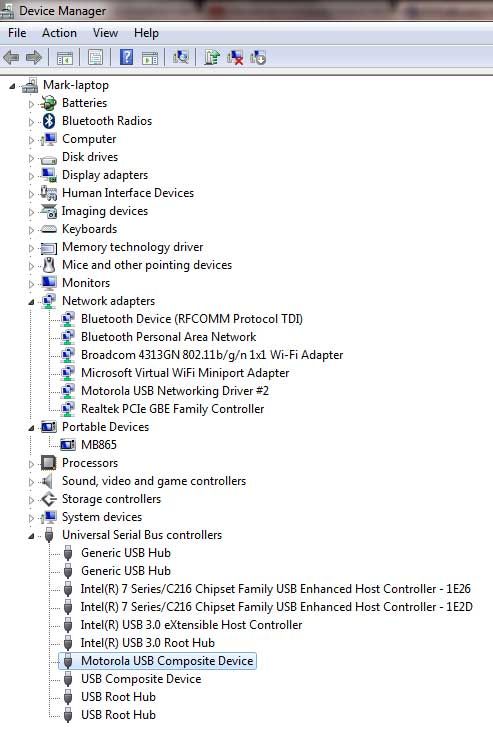
It must be a driver issue. Please post a screenshot of the device manager when the phone is plugged to the USB-Port.
Also ensure that USB-Tethering is turned OFF in the phone
It must be a driver issue. Please post a screenshot of the device manager when the phone is plugged to the USB-Port.
Also ensure that USB-Tethering is turned OFF in the phone
Ich bitte um Verständnis daß ich aufgrund des hohen Aufkommens im Forum und meines zeitlichen Rahmens nichtmehr jeden Thread im Forum persönlich lesen bzw. beantworten kann.
Bitte benutzt auch die Forum-Suche bzw. die FAQ
Bitte benutzt auch die Forum-Suche bzw. die FAQ

-
user_deleted
Hi,
it must have something to do with the drivers.
Sorry, don't have a motorola, but on my three devices (Google Nexus, HTC Incredible and HTC Legend) it looks like this:
(left = Google Nexus, right = HTC device(s))
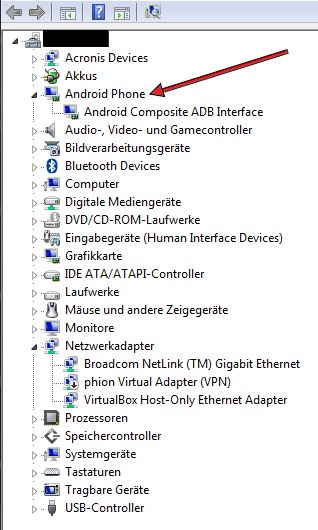
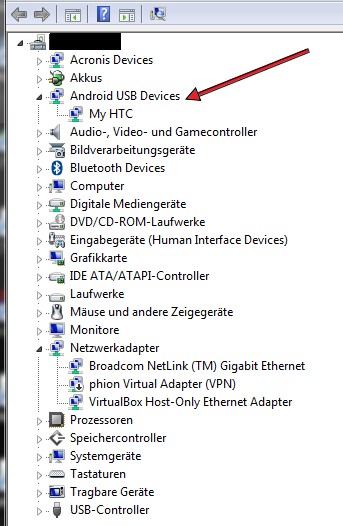
But maybe there are some other problems with Motorola drivers as described here at droidforums.net.
best regards...
it must have something to do with the drivers.
Sorry, don't have a motorola, but on my three devices (Google Nexus, HTC Incredible and HTC Legend) it looks like this:
(left = Google Nexus, right = HTC device(s))
But maybe there are some other problems with Motorola drivers as described here at droidforums.net.
best regards...
I don't think it's the drivers as they were working fine before the ICS upgrade and the link you provided is from 2011. I've had it working fine since then. Also, the usb connection to the phone works fine for other apps, file transfers, etc.
My own problem is now solved as I just tried it with a Wi-Fi link and the phone connected and is working fine with MyPE. Thanks!
I still suspect that it may have something to do with the fact that the recent Android ICS upgrade on this phone no longer has a "Charge Only" option for the usb connection?
I'm willing to help you troubleshoot this if you are interested. I have a sw degree and work in the industry so I know enough to be dangerous. Let me know if you would like to investigate this.
Thanks for the help here, and for all you do to make this wonderful app available.
My own problem is now solved as I just tried it with a Wi-Fi link and the phone connected and is working fine with MyPE. Thanks!
I still suspect that it may have something to do with the fact that the recent Android ICS upgrade on this phone no longer has a "Charge Only" option for the usb connection?
I'm willing to help you troubleshoot this if you are interested. I have a sw degree and work in the industry so I know enough to be dangerous. Let me know if you would like to investigate this.
Thanks for the help here, and for all you do to make this wonderful app available.
-
mgm1001001
- Beiträge: 1
- Registriert: Fr 30. Nov 2012, 19:57
Atrix 2 wont connect
Hi,
I have an Atrix2 which is now on ICS and I am also faced with the same problem. Any solution for the same?
I have an Atrix2 which is now on ICS and I am also faced with the same problem. Any solution for the same?
@vu2pmc: probably USB-Debugging was disabled while updating or you need new ADB drivers
@lakeguy: Yes, its a drastic step. But you say the phone did not boot - has this anything to do with MyPhoneExplorer ? I think not
@lakeguy: Yes, its a drastic step. But you say the phone did not boot - has this anything to do with MyPhoneExplorer ? I think not
Ich bitte um Verständnis daß ich aufgrund des hohen Aufkommens im Forum und meines zeitlichen Rahmens nichtmehr jeden Thread im Forum persönlich lesen bzw. beantworten kann.
Bitte benutzt auch die Forum-Suche bzw. die FAQ
Bitte benutzt auch die Forum-Suche bzw. die FAQ