Control Phone window is the wrong orientation

For user who dont speak german please use this part of my forum
steve333
Beiträge: 7
Registriert: Mo 18. Dez 2017, 14:54

Control Phone window is the wrong orientation

Beitrag von steve333 »

Firstly, just wanted to say that MyPhoneExplorer is fantastic. I've been using it for a number of years now to speed up interactions with my phone. It's a massive time saver for me.

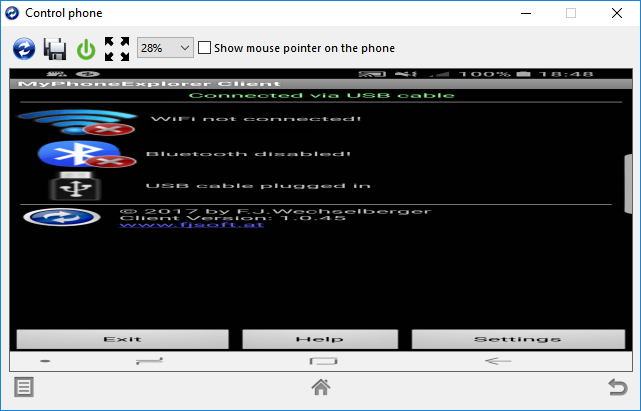
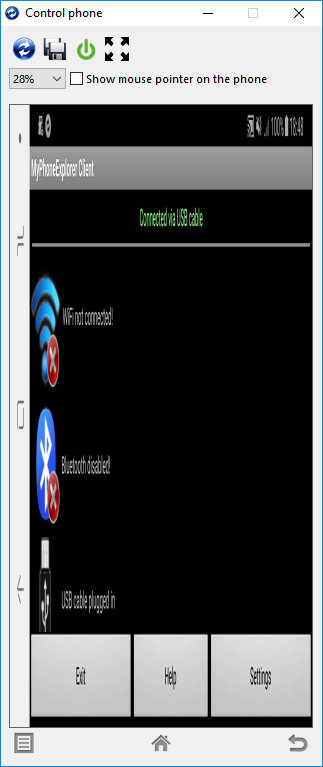
I've got this issue at the moment though where the orientation of the Control Phone screen and my actual phone screen are out of sync. Although the Control Phone screen is showing the actual phone desktop in the correct orientation, the window that it is in is 90 degrees out of sync, and hence the phone image is really stretched or really squeezed to fit into the available space. I've tried uninstalling both the phone app and the Windows application and neither has fixed it. I've also tried rotating the phone with and without the Control Phone screen enabled. Nothing I do brings them back into sync.

I'm using a Samsung Galaxy S8. This did happen once before using an old S4 and I did manage to fix it at the time, but I have no idea what I did back them to resolve it.

Has anyone else had this problem please, and is there a simple fix?

Cheers,

Steve.
steve333
Beiträge: 7
Registriert: Mo 18. Dez 2017, 14:54

Beitrag von steve333 »

Here are some screenshots of the issue:

Portrait:
Bild

Landscape:
Bild

I hope this helps!

Steve.
steve333
Beiträge: 7
Registriert: Mo 18. Dez 2017, 14:54

Beitrag von steve333 »

I should also mention that I'm using Windows 10.
icke1954
Moderator
Beiträge: 18155
Registriert: Sa 19. Apr 2014, 10:35

Beitrag von icke1954 »

Hi, I can't help you.
Please send an E-Mail to FJ => Impressum
Zuletzt geändert von icke1954 am Mo 16. Mär 2020, 23:02, insgesamt 1-mal geändert.
steve333
Beiträge: 7
Registriert: Mo 18. Dez 2017, 14:54

Beitrag von steve333 »

Thanks. I'll try that. Steve.
Der Geister
Beiträge: 23
Registriert: Do 7. Sep 2017, 23:21

Beitrag von Der Geister »

I know this has been posted a while ago but I am experiencing the same situation for a while now.

Did you find any resolution on this that you can share? I have sent an email to Franz as suggested, hopefully I can share something if I hear back.
steve333
Beiträge: 7
Registriert: Mo 18. Dez 2017, 14:54

Beitrag von steve333 »

Upgrading both the phone app and the Windows app solved the problem for me.
steve333
Beiträge: 7
Registriert: Mo 18. Dez 2017, 14:54

Beitrag von steve333 »

P.S. If it works for you I recommend donating a small amount by way of thanks to the author. :)
Der Geister
Beiträge: 23
Registriert: Do 7. Sep 2017, 23:21

Beitrag von Der Geister »

steve333 hat geschrieben:Upgrading both the phone app and the Windows app solved the problem for me.


I am running the latest version of both, so there is nothing for me to upgrade.
Der Geister
Beiträge: 23
Registriert: Do 7. Sep 2017, 23:21

Beitrag von Der Geister »

steve333 hat geschrieben:P.S. If it works for you I recommend donating a small amount by way of thanks to the author. :)


That's really not your place to say, given that you don't know if I have or do already or not, so please let's keep it on topic.
steve333
Beiträge: 7
Registriert: Mo 18. Dez 2017, 14:54

Beitrag von steve333 »

Fair point, but it was only a suggestion. Apologies for any offence caused.

If you're already up to date with upgrading I recommend emailing FJ using the link further up this thread.
Der Geister
Beiträge: 23
Registriert: Do 7. Sep 2017, 23:21

Beitrag von Der Geister »

steve333 hat geschrieben:If you're already up to date with upgrading I recommend emailing FJ using the link further up this thread.


I did already and he responded with a debug version for me to try and I will be installing it later to find out if the issue resolves so I can provide him feedback on it.

I will also ask him, if he want to share the solution to post it here for future users, or just wait until it is put into the next official release.
Antworten