Seite 1 von 1
How to connect phone using two method?
Verfasst: Fr 19. Feb 2010, 09:46
von Blackout
Hy,
MPE is the best phone management software ever. I just have one question though. How to connect my phone using two method(bluetooth and cable) in a single profile? Currently i have to go settings and click search for device everytime when i change from cable to bluetooth or vice versa. Is there any other way? Or is there a way to make it automatically search all COM ports for the phone when it didn't find the phone on the main COM port?
Thanks.
Verfasst: Fr 19. Feb 2010, 10:00
von FJ
Since MyPhoneExplorer 1.7.3 i did add a new setting called "Alternative Port". Set the default Port to the USB-Cable, then set the Alternative Port to the Bluetooth-Port. MyphoneExplorer will connect via USB, if it fails then he tries the Bluetooth-Port.
Verfasst: Fr 19. Feb 2010, 10:12
von Blackout
Thanks. I'm only noticing the alternative port after upgrading from 1.7.4 to 1.7.5.
Verfasst: Mi 17. Mär 2010, 04:04
von Gast
FJ hat geschrieben:Since MyPhoneExplorer 1.7.3 i did add a new setting called "Alternative Port". Set the default Port to the USB-Cable, then set the Alternative Port to the Bluetooth-Port. MyphoneExplorer will connect via USB, if it fails then he tries the Bluetooth-Port.
where can i find this in MPE?
I am using P990i and just upgraded to MPE1.7.5
Verfasst: Mi 17. Mär 2010, 19:10
von FJ
This setting is not visible for Symbian-Phones cause its in general not recommened to use Bluetooth-Connection with this type of phones.
Verfasst: So 29. Aug 2010, 07:17
von jrshami
"Since MyPhoneExplorer 1.7.3 i did add a new setting called "Alternative Port". Set the default Port to the USB-Cable, then set the Alternative Port to the Bluetooth-Port. MyphoneExplorer will connect via USB, if it fails then he tries the Bluetooth-Port."
Where can I find this setting? I am using a K320i and MPE 1.7.6
JRS
Verfasst: So 29. Aug 2010, 10:34
von user_deleted
Choose menu File > Settings, there you should find that options.
br...
K320i USB
Verfasst: So 29. Aug 2010, 17:38
von jrshami
Mr. Deauville hat geschrieben:Choose menu File > Settings, there you should find that options.
br...
I'm afraid that the USB option is not present under File > Settings.
Verfasst: So 29. Aug 2010, 22:59
von user_deleted
Hi again,
first thing you have to do is to establish an USB connection to your phone.
To do this, you have to install the USB drivers for your model.
If done, go to menu
File > Settings and click on "
Search for device".
Once the connection (1) was established, you will see the option to an alternate port (2).
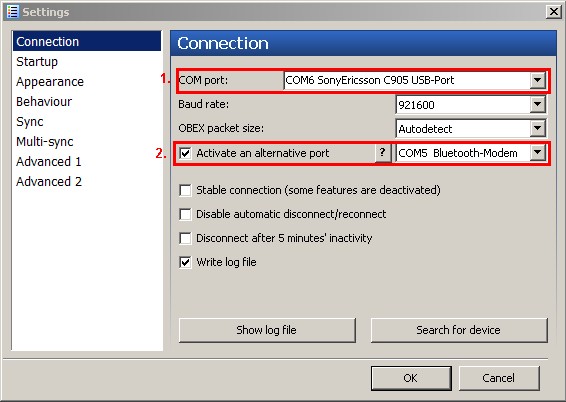
br...
K320i USB port
Verfasst: Mo 30. Aug 2010, 08:45
von jrshami
Mr. Deauville hat geschrieben:Hi again,
first thing you have to do is to establish an USB connection to your phone.
To do this, you have to install the USB drivers for your model.
If done, go to menu
File > Settings and click on "
Search for device".
Once the connection (1) was established, you will see the option to an alternate port (2).
br...
It worked! Thank you very much.
Cheers!
Javaid